# (Descontinuado)Manual do Gestor de Conteúdo

# Adicionar arquivos

##### <span id="bkmrk--1" style="font-weight: normal;">![](https://lh7-rt.googleusercontent.com/slidesz/AGV_vUf6d0AbF880-k2JRkaYvo_ySDZ1lJL4s9VBQKLJZDMePoyWyR3hJubm8iIZDyuulWIAWlRxA1vkMIAYCX4l1501FaJX0KUpTdz2O_9daN_CPqSYcTvMCqyHV2r2_eRL4C6dJLdejJUO1pFkYaJNmUkRAJwrRiGFrq8SF-C_UuLnv8focn316S4=s2048?key=eDzikK_a11Webq5oUZnsTg)![](https://lh7-rt.googleusercontent.com/slidesz/AGV_vUcJNu7MVj2eJXLbzQ9uHleZwaTW9S9ctxg8-G9JUzjlITLmpwies6WQahG7LVtGkB0fQQVCP5Jl_CMpweMJ50S71lZaNK-kODZ6GhEdebLQLWHohMUESOrgRrH0YPLoC1L1tLgKLJlt0wKL8HpMHjzJqVbi49VTfJdAW-lANzhZTKrC8eZwBw=s2048?key=eDzikK_a11Webq5oUZnsTg)![](https://lh7-rt.googleusercontent.com/slidesz/AGV_vUetm1Q0RQyDulAQXbt6uGcvYbDFqAkywrHdplucMTd2DVv-k_z-cYuqBJvBz14vn02H34oXlqfzy9lZpgsqy_eHo6fj17JFqmtIIvKTkdqF5j8eXZLxo36b94fQx-qpl_-gK5R__w40TzXHf8e5-VAc68toU1apQXwKEtRY7KwexLUX9OSi8YA=s2048?key=eDzikK_a11Webq5oUZnsTg)![](https://lh7-rt.googleusercontent.com/slidesz/AGV_vUf_OgyUD4a396VtHAKJXyaqwpmZ5xcW6yv92MFWOF3ylAzl-JeApZQOHdi_66JRsAaHHcDYbvtUIhxc7pmKbLsgqHHlyD5xs0pMZcrucyGLppRDKchvhq3cwa8Tbp2w3FIg35IN-TECb14_xsJUM_qC0GhGPe-xCv56545OxcDLe5Yyg42SRwY=s2048?key=eDzikK_a11Webq5oUZnsTg)  
</span>

- #### Clique na biblioteca
- #### Clique em Adicionar mais arquivos
- #### Selecione o arquivo de deseja fazer Upload

##### <span style="font-size: 18pt; font-family: Arial,sans-serif; color: #595959; background-color: transparent; font-weight: 400; font-style: normal; font-variant: normal; text-decoration: none; vertical-align: baseline; white-space: pre-wrap;"><span id="bkmrk--3" style="font-weight: normal;">![](https://lh7-rt.googleusercontent.com/slidesz/AGV_vUf7mPl5phCRQA_gji9BW28FidFdt9i36HEkef1SfKoquOnIJyWFPEcAkfEpS_hHkAFl-W9xWhmhoUCnj-AiuJF1pi5DjIqynt-7yAknE1DMfiUIRqlaKu7Um9_W4UndGL1rWIlrfV3Y98cEOQZNMh1TRJlRjPKfSOuP1-4DRJypwx8kO7u69P8=s2048?key=eDzikK_a11Webq5oUZnsTg)![](https://lh7-rt.googleusercontent.com/slidesz/AGV_vUd3bS5obJVyBTHN9mQjoL-cqQIEnDbAHFO2y3ScDaH_xjPgDJBSsE9J_rp9o4Ww3hLQYuPGX71JK6AHW5h4zs5brp9-kjTThXfiukgJJLuqjKOw-gDwhTbsanN-n6D-YXaW37ok3XZH67Ml5n_J27GVY_ymKGuw1D0sxwKFDfkV8kPeZWR0WbE=s2048?key=eDzikK_a11Webq5oUZnsTg)![](https://lh7-rt.googleusercontent.com/slidesz/AGV_vUd5RwVmrHDJYnPoI0OBNXOZOQ1SizoZZ1uJ3aG6fpIg2_wI-9k7q9MtF-U6Wkot1HNX7hPpHwHcRoNgApCJUpsj9A8OifONSqeFjFVJtb_hK4m-tUZnl5Ka_q_Om-XuyO534zcpJPVNXQ7Y3C7QPZtYJy-m84Az5j-ySLxZ1BIayBQ6pv5WUw=s2048?key=eDzikK_a11Webq5oUZnsTg)</span></span>

- #### Clique na Biblioteca de Mídia
- #### Clique no centro do PDF, irá abrir os Detalhes dele
- #### No canto superior direito, tem um ícone para copiar o link

##### <span id="bkmrk--5" style="font-weight: normal;">![](https://lh7-rt.googleusercontent.com/slidesz/AGV_vUf3SQpGwpCYlMne76TSprdZTp7w6iubLP3GTrJcCZM31r3GpHmnLsDE_S3Lbv4LkmdbmvTDf7l49OskdM7suzq6IDHzyGQL7M-5EuuL8_EiXCUNOziF7zQl2-_TsKQx53VkqXCopkYtUrKeE1_pwliTPAbHFD06-PTZSbU6oWaFaAQIPj6uI38=s2048?key=eDzikK_a11Webq5oUZnsTg)![](https://lh7-rt.googleusercontent.com/slidesz/AGV_vUcpW4LM1VZa0is96YjJk9R32IOKqXdbpT0It5zc4D9E49YyBLpqwQNkQIBx71XqU5JkcuEc_h3kQgOyStNw5D-NJ0X6783W-4Eb1yO9sCkc8orSuybtESB2SY_tdpUcvgehxTJwBL4iff_qSXyx_2V26wR653BJXf5v2xPTpUj-tvQXwhDRJjM=s2048?key=eDzikK_a11Webq5oUZnsTg)  
</span>

- #### Selecione um texto no Conteúdo, com o botão esquerdo do mouse
- #### Clique em "Link"
- #### Cole o Link do PDF, e salva ele no botão

# Adicionar vídeos do Youtube

#### <span id="bkmrk--1" style="font-weight: normal;">Siga o passo a passo abaixo:</span>

<span id="bkmrk--3" style="font-weight: normal;">![](https://lh7-rt.googleusercontent.com/slidesz/AGV_vUc1hgPiKOOkQaDipeSNFkc2XOTOrRcwsqmyJEqv1dQGS2BBzRHsUfT3aQMl12gSOxewMlxwY9hMz3QglQD0hRRu2jDxTBQUbvs7iMdXWuhxNKF1QpzqFod5HgkTXeiaGubBwg-12T1tGbMj-c9LSL4LpIlJIV-5=s2048?key=RDETvQLDz_5wzaGNW9FF5-vh)![](https://lh7-rt.googleusercontent.com/slidesz/AGV_vUc1hgPiKOOkQaDipeSNFkc2XOTOrRcwsqmyJEqv1dQGS2BBzRHsUfT3aQMl12gSOxewMlxwY9hMz3QglQD0hRRu2jDxTBQUbvs7iMdXWuhxNKF1QpzqFod5HgkTXeiaGubBwg-12T1tGbMj-c9LSL4LpIlJIV-5=s2048?key=RDETvQLDz_5wzaGNW9FF5-vh)![](https://lh7-rt.googleusercontent.com/slidesz/AGV_vUfcrjSesvc5RzyQV5hbhRsQivD8Kl0wnIT6Q-npgUcKER3b4Dq1Tv66w1XdGal0HcGF1CsHUO51KF3UuTICgV9i-Lt2zWOhrP8mXiBE1PbJ9uRMZd9KB3YyvRZ4TrUcOD0XU8EmR8MUp9jfYWmSmhRyKuu5ZYcZ=s2048?key=RDETvQLDz_5wzaGNW9FF5-vh)</span>

##### <span id="bkmrk-ap%C3%B3s-isso%2C-salve-a-p-1" style="font-weight: normal;">![](https://lh7-rt.googleusercontent.com/slidesz/AGV_vUdTGtpGekON8iRaO6GNQP8TY_6P33_lmaEP-l85HS0fHk6sgk0kn7SHkYnGU_PB1pqUAmVjtk9_V-j1H_YoXUEktI0mTwx52OrfmYEPGXBOS341qASE2P4jr4mIxokeUMwPBQsVPeClXuzYrMRTNU27DnBCVnda=s2048?key=RDETvQLDz_5wzaGNW9FF5-vh)Após isso, salve a publicação, e o vídeo estará na publicação</span>

# Dimensões das Imagens de capa

- ##### **Banners**: 1115px(largura) x 300px(altura)
- ##### **Capa Notícia**: 450px(largura) x 370px(altura)
- ##### **Capa Edital**: 352px(largura) x 200px(altura)
- ##### A largura e altura das capas de notícia e edital são ajustáveis, sendo esses números as medidas mínimas. Caso sejam maiores, a imagem irá se aproximar. Exemplo: caso a largura ou altura seja bem maior que a informada, irá mostrar apenas o centro da imagem nessa proporção informada. Exemplo ilustrado no próximo slide;
- ##### Banners tem o tamanho fixo;


<span style="font-size: 18pt; font-family: Arial,sans-serif; color: #000000; background-color: transparent; font-weight: bold; font-style: normal; font-variant: normal; text-decoration: none; vertical-align: baseline; white-space: pre-wrap;">Exemplo de como é mostrada uma imagem com dimensão maior:</span>

- <span style="font-size: 18pt; font-family: Arial,sans-serif; color: #000000; background-color: transparent; font-weight: 400; font-style: normal; font-variant: normal; text-decoration: none; vertical-align: baseline; white-space: pre-wrap;">A esquerda está a Imagem original;</span>
- <span style="font-size: 18pt; font-family: Arial,sans-serif; color: #000000; background-color: transparent; font-weight: 400; font-style: normal; font-variant: normal; text-decoration: none; vertical-align: baseline; white-space: pre-wrap;">A direita é como a Imagem é exibida;</span>

<span id="bkmrk--1" style="font-weight: normal;">  
<span id="bkmrk--2" style="font-weight: normal;">![](https://lh7-rt.googleusercontent.com/slidesz/AGV_vUeqtGP8xK5wWIgIw9Bj61Gdf4hbUOfp9HOdmXYbsf1ywJj4FgJ_HogdZiYmKjgVwcZ67Ju_kigUnKWy2EUo1iNKz9pptr3Glo2feGahu1rcM6iKLB1dJwOs-bQTzBdWG6EM6oEeX5YuCvJpjnGbZbsxXcxAtovk=s2048?key=0oNLruv-e-y17mCx5tfJlQ)</span>![](https://lh7-rt.googleusercontent.com/slidesz/AGV_vUfHdR3IdZFgdhZS_z1lImOISUR4EgDiVIvngCMRUlc_4fEu-dZZorod09Nrbzug7IjYiBlzLPpU_K08OAkaYCJcUyt0MAf8XNrlgEPXXh1H83l3tmIQ1HhOb8TY5JLvpKhb-D1WE5XIrHxzN3RDw-7MPwRBQbav=s2048?key=0oNLruv-e-y17mCx5tfJlQ)</span>

# Publicação de Evento

**![](https://lh7-rt.googleusercontent.com/slidesz/AGV_vUcssUG_8-YLWVYKvyN1IfUUwJCLDC-zemxqtLyFTac9ixpdTzxeu6z8adpKi5bNRnLiNoHhPp87IccGwf8Eujnihe0_Ja9pQuEUy24_9-6UdvMBDtR5XbuEFzha7lGp-6ltwcEIKvk72S1hw-Q1RcQrXWEKr15y=s2048?key=0oNLruv-e-y17mCx5tfJlQ)**

<span style="font-size: 12pt; font-family: Raleway,sans-serif; color: #000000; background-color: transparent; font-weight: bold; font-style: normal; font-variant: normal; text-decoration: none; vertical-align: baseline; white-space: pre-wrap;">Campos exclusivamente para Eventos</span><span style="font-size: 12pt; font-family: Raleway,sans-serif; color: #000000; background-color: transparent; font-weight: 400; font-style: normal; font-variant: normal; text-decoration: none; vertical-align: baseline; white-space: pre-wrap;">, sendo essencial para mostrar os eventos em destaque.</span>

- <span style="font-size: 12pt; font-family: Raleway,sans-serif; color: #000000; background-color: transparent; font-weight: bold; font-style: normal; font-variant: normal; text-decoration: none; vertical-align: baseline; white-space: pre-wrap;">InicioEvento: </span><span style="font-size: 12pt; font-family: Raleway,sans-serif; color: #000000; background-color: transparent; font-weight: 400; font-style: normal; font-variant: normal; text-decoration: none; vertical-align: baseline; white-space: pre-wrap;">informar a data inicial que irá ocorrer o evento;</span>
- <span style="font-size: 12pt; font-family: Raleway,sans-serif; color: #000000; background-color: transparent; font-weight: bold; font-style: normal; font-variant: normal; text-decoration: none; vertical-align: baseline; white-space: pre-wrap;">ConclusaoEvento:</span><span style="font-size: 12pt; font-family: Raleway,sans-serif; color: #000000; background-color: transparent; font-weight: 400; font-style: normal; font-variant: normal; text-decoration: none; vertical-align: baseline; white-space: pre-wrap;"> informar a data que iŕa concluir o evento;</span>

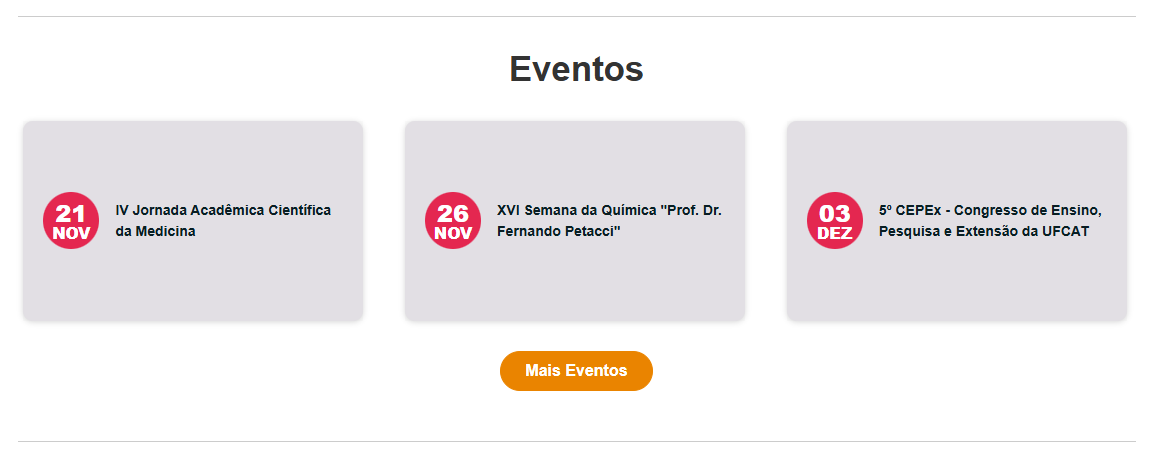
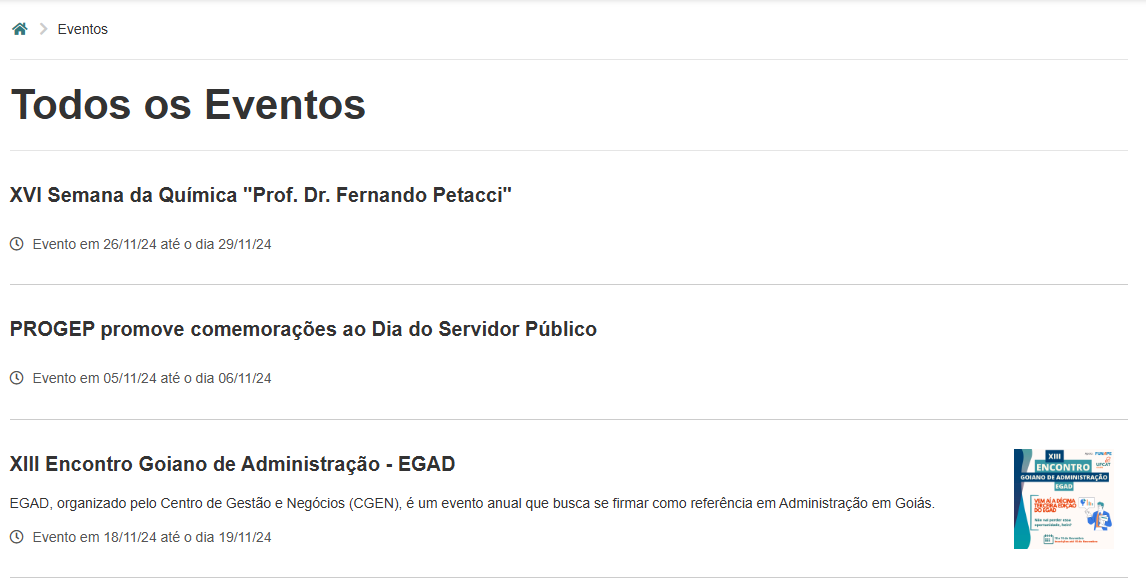
<span style="font-size: 12pt; font-family: Raleway,sans-serif; color: #000000; background-color: transparent; font-weight: 400; font-style: normal; font-variant: normal; text-decoration: none; vertical-align: baseline; white-space: pre-wrap;">Com isso, a publicação irá aparecer na sessão de Eventos, da página principal:</span>

[![image.png](https://manuais.ufcat.edu.br/uploads/images/gallery/2024-11/scaled-1680-/tzQimage.png)](https://manuais.ufcat.edu.br/uploads/images/gallery/2024-11/tzQimage.png)

[![image.png](https://manuais.ufcat.edu.br/uploads/images/gallery/2024-11/scaled-1680-/aF8image.png)](https://manuais.ufcat.edu.br/uploads/images/gallery/2024-11/aF8image.png)
# Publicação com Redirecionamento

### \*Não funciona para publicações de Menus\*

**![](https://lh7-rt.googleusercontent.com/slidesz/AGV_vUe80spSuZZ7Lhn-Ryb3LJgCepiG4bomh2EW5BawrKfDV-bln08f_i7ZH2P4pxVU-RNqmUk1g9yPkp1YuaysuSoJr5vNBsG7A_dEsGqdFHCm1m35S7CLmgSkvmEk2CEmQ7RGgpOGu_Dys42OerExWRF5iHvbH4U=s2048?key=0oNLruv-e-y17mCx5tfJlQ)**

<span style="font-size: 12pt; font-family: Raleway,sans-serif; color: #000000; background-color: transparent; font-weight: bold; font-style: normal; font-variant: normal; text-decoration: none; vertical-align: baseline; white-space: pre-wrap;">Campos exclusivamente para Publicações com redirecionamento</span><span style="font-size: 12pt; font-family: Raleway,sans-serif; color: #000000; background-color: transparent; font-weight: 400; font-style: normal; font-variant: normal; text-decoration: none; vertical-align: baseline; white-space: pre-wrap;">, caso a publicação já esteja postada em outro Portal. Não Ative o campo <span style="font-size: 12pt; font-family: Raleway,sans-serif; color: #000000; background-color: transparent; font-weight: bold; font-style: normal; font-variant: normal; text-decoration: none; vertical-align: baseline; white-space: pre-wrap;">PublicacaoComRedirecionamento </span><span style="font-size: 12pt; font-family: Raleway, sans-serif; color: rgb(0, 0, 0); background-color: transparent; font-style: normal; font-variant: normal; text-decoration: none; vertical-align: baseline; white-space: pre-wrap;">caso não tenha link anexado no campo <span style="font-size: 12pt; font-family: Raleway,sans-serif; color: #000000; background-color: transparent; font-weight: bold; font-style: normal; font-variant: normal; text-decoration: none; vertical-align: baseline; white-space: pre-wrap;">URLDestino.</span></span></span>

- <span style="font-size: 12pt; font-family: Raleway,sans-serif; color: #000000; background-color: transparent; font-weight: bold; font-style: normal; font-variant: normal; text-decoration: none; vertical-align: baseline; white-space: pre-wrap;">PublicacaoComRedirecionamento: </span><span style="font-size: 12pt; font-family: Raleway,sans-serif; color: #000000; background-color: transparent; font-weight: 400; font-style: normal; font-variant: normal; text-decoration: none; vertical-align: baseline; white-space: pre-wrap;">por padrão está desativado, caso </span><span style="font-size: 12pt; font-family: Raleway,sans-serif; color: #000000; background-color: transparent; font-weight: bold; font-style: normal; font-variant: normal; text-decoration: none; vertical-align: baseline; white-space: pre-wrap;">Ativado, </span><span style="font-size: 12pt; font-family: Raleway,sans-serif; color: #000000; background-color: transparent; font-weight: 400; font-style: normal; font-variant: normal; text-decoration: none; vertical-align: baseline; white-space: pre-wrap;">preencha o campo seguinte;</span>
- <span style="font-size: 12pt; font-family: Raleway,sans-serif; color: #000000; background-color: transparent; font-weight: bold; font-style: normal; font-variant: normal; text-decoration: none; vertical-align: baseline; white-space: pre-wrap;">URLDestino:</span><span style="font-size: 12pt; font-family: Raleway,sans-serif; color: #000000; background-color: transparent; font-weight: 400; font-style: normal; font-variant: normal; text-decoration: none; vertical-align: baseline; white-space: pre-wrap;"> informar a URL para qual a publicação será direcionada. </span><span style="font-size: 12pt; font-family: Raleway,sans-serif; color: #000000; background-color: transparent; font-weight: bold; font-style: normal; font-variant: normal; text-decoration: none; vertical-align: baseline; white-space: pre-wrap;">Copie o link do Navegador, sendo obrigatório o “http ou https” antes.</span><span style="font-size: 12pt; font-family: Raleway,sans-serif; color: #000000; background-color: transparent; font-weight: 400; font-style: normal; font-variant: normal; text-decoration: none; vertical-align: baseline; white-space: pre-wrap;"> Exemplo: </span><span style="font-size: 12pt; font-family: Raleway,sans-serif; color: #000000; background-color: transparent; font-weight: 400; font-style: italic; font-variant: normal; text-decoration: none; vertical-align: baseline; white-space: pre-wrap;">https://ufcat.edu.br/noticias/teste</span><span style="font-size: 12pt; font-family: Raleway,sans-serif; color: #000000; background-color: transparent; font-weight: 400; font-style: normal; font-variant: normal; text-decoration: none; vertical-align: baseline; white-space: pre-wrap;">;</span>

# Publicação de Menu

##### Publicações com a categoria Menu, são páginas criadas a parte, podendo ser utilizada para criar novas páginas.

#### O campo **Slug**, é o responsável pelo endereço da página:

#### ![](https://lh7-rt.googleusercontent.com/slidesz/AGV_vUcKqN6yNfCO6hmdcZFx6BseuSLGa1x9wIY4_w64a5WXDY7uDRW-b7p7BBs2UnQSzwx4iZso63mn3FBK_MZ1sA0cx26YMyTXPh_f8CiO2kDJePWQKHdRh1Esdw5aW8FWFjdObMAbmSiaHAx75SVyT9VvvOb6wA2G=s2048?key=0oNLruv-e-y17mCx5tfJlQ)

##### Ao criarmos os Menus solicitados, iremos criar artigos com os menus relacionados.

#### É preciso que **não** modifiquem este campo, caso seja um artigo vinculado em um menu do portal.

---

#### Para caso precisem criar uma nova página estática, podem utilizar esta categoria Menu.

##### Para vincular no conteúdo em uma publicação, copie o conteúdo do campo **slug,** e cole como **link** em uma publicação.

# Slides de Treinamento - Explicações dos campos da publicação

Segue o link, para acessar os slides de Treinamento, sobre criação de publicações:

[https://drive.google.com/file/d/1Pp4RORVjijK-hhutXTTtuLWgmdFt8-8y/view?usp=sharing](https://drive.google.com/file/d/1Pp4RORVjijK-hhutXTTtuLWgmdFt8-8y/view?usp=sharing)

Obs; é preciso estar logado na conta @ufcat.edu.br

# Corrigir - Tabelas quebrando o layout da publicação

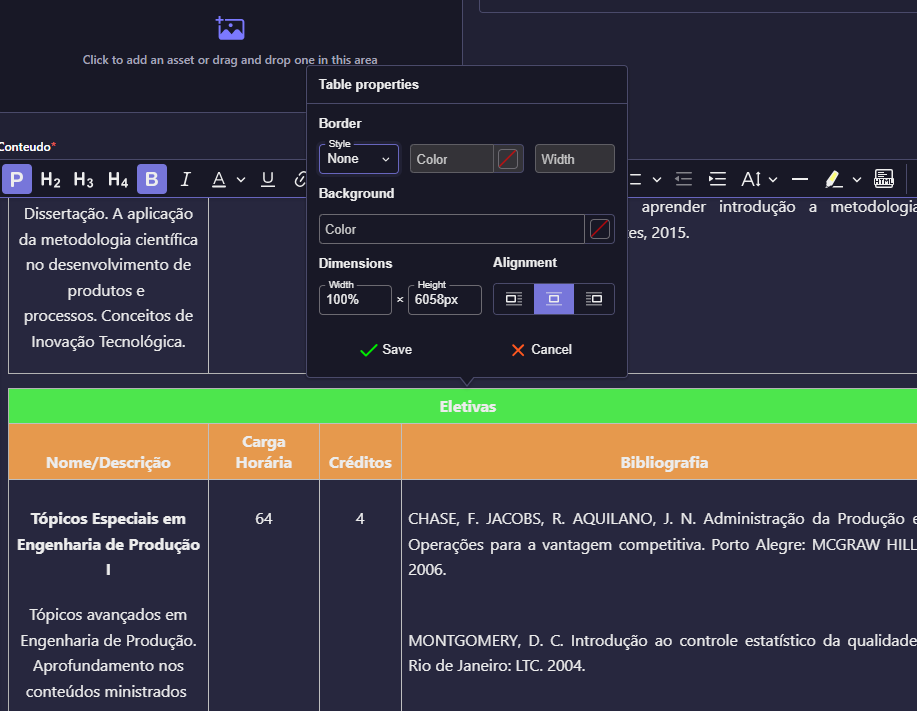
##### Quando a tabela é copiada do navegador, ela vem com algumas propriedades que quebram o layout.

##### Podemos ver clicando na tabela, e em propriedades.

##### [![Captura de tela 2025-04-11 103515.png](https://manuais.ufcat.edu.br/uploads/images/gallery/2025-04/scaled-1680-/captura-de-tela-2025-04-11-103515.png)](https://manuais.ufcat.edu.br/uploads/images/gallery/2025-04/captura-de-tela-2025-04-11-103515.png)
##### Para corrigir o problema, é preciso tirar essa propriedade de altura, que como podemos ver está bem grande.

##### Remova o conteúdo da propriedade "**height**", salve e fazendo isso já funcionará.  


##### [![Captura de tela 2025-04-11 103409.png](https://manuais.ufcat.edu.br/uploads/images/gallery/2025-04/scaled-1680-/captura-de-tela-2025-04-11-103409.png)](https://manuais.ufcat.edu.br/uploads/images/gallery/2025-04/captura-de-tela-2025-04-11-103409.png)